Cutting Salesforce onboarding from 60 to 15 minutes
Sixty minutes was way too long.
OnboardingData-drivenSalesforceMixpanel
75%
Onboarding time cut
60→15
Minutes end-to-end
4×
Faster time-to-first-send
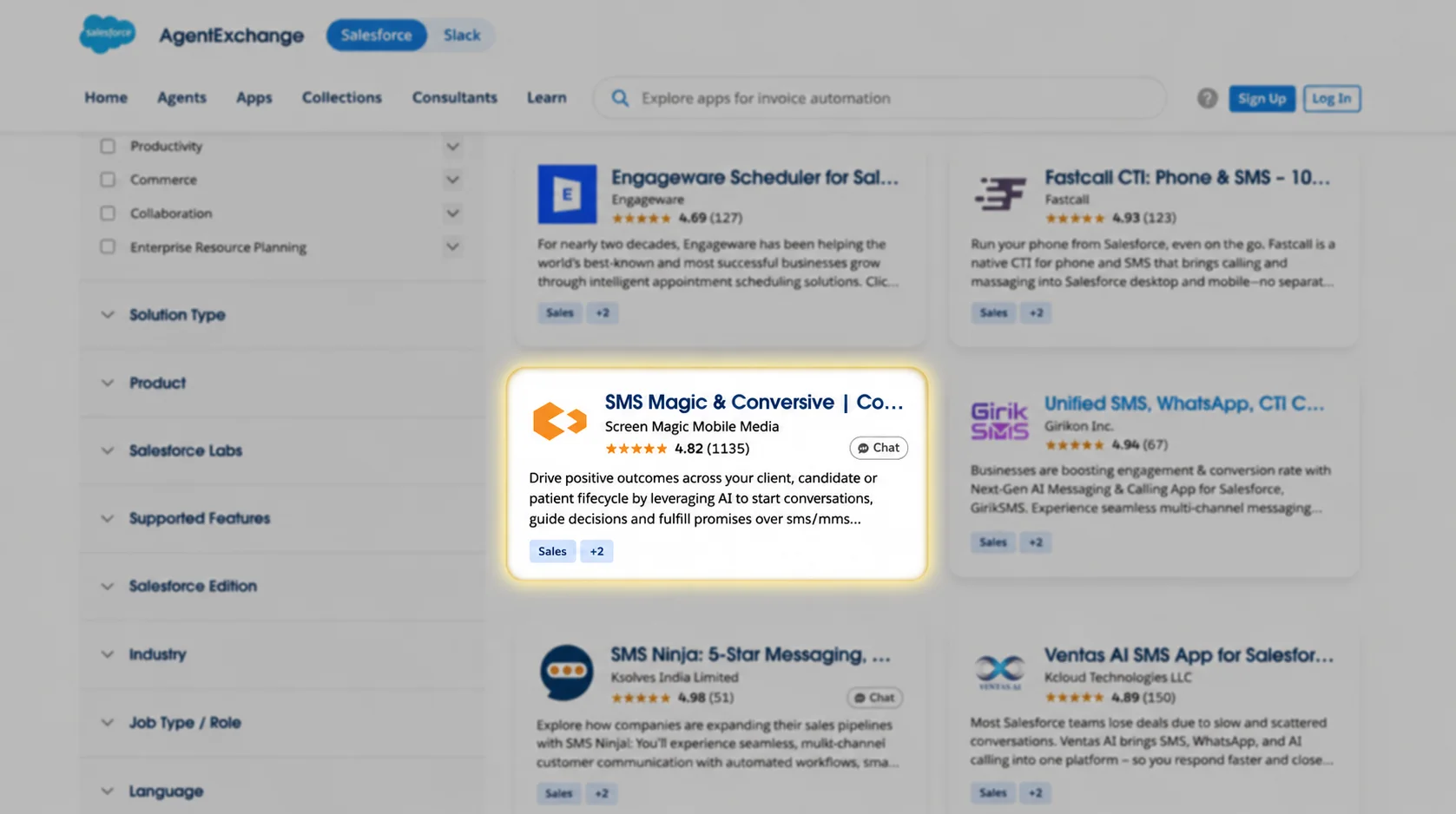
The AppExchange listing, where most new customers first met the product and where onboarding began.
New Salesforce customers had to complete two disconnected steps, installing the package and then creating an account, with no handoff between them. Get the order wrong and O&I had to manually rebuild the whole setup. I redesigned the flow end-to-end: one guided AppExchange path with SSO, automatic account linking, and self-serve templates. Time-to-first-message dropped from 60 minutes to 15.
✦
Context
CompanySMS-Magic
TimelineAugust 2023 – May 2024
RoleAssociate PM (owned the Salesforce onboarding workstream)
Team
EngineeringO&I
SMS-Magic is a messaging platform built for Salesforce and Zoho. Most new customers discovered it through the AppExchange, installed it, then had to separately connect an SMS-Magic account by hand.
I identified the activation problem through Mixpanel data and O&I input, defined the redesigned flow end-to-end, and wrote the PRD covering the AppExchange entry point, SSO integration, account linking logic, Workspace, and trial provisioning. I also set the scope and selection criteria for the pre-built templates.
Engineering owned the SSO and account-linking implementation; the O&I team owned which configurations went into the template library. I owned the problem framing, the end-to-end flow design, and the PRD.
✦
The Problem
Customers had two disconnected paths: install the Salesforce package, then separately create and link an SMS-Magic account. Nothing handed off between them, so getting the order wrong broke the setup silently.
A task that should have taken minutes was consuming hours.
✦
Discovery
Time-to-first-message was the tell
Mixpanel showed customers taking 60+ minutes on average just to send their first message, a direct proxy for activation.
The friction was at step one
O&I confirmed it: customers were getting stuck or missequencing Salesforce setup before they’d even touched the product.
Source: Mixpanel time-to-first-message analytics · O&I ticket and call patterns
Digging deeper, the platform couldn’t even reliably detect whether a customer had installed the Salesforce package or not, so any customer who stumbled on the wrong order or missed a step ended up with a broken setup the O&I team had to manually fix from scratch.
✦
Key Decisions
01
Make AppExchange the single entry point
One guided path instead of two. There’s no wrong order left to get stuck in.
The core fix was structural: eliminate the two-path problem entirely. Clicking "Get It Now" on AppExchange now kicks off a single guided flow, covering SSO authentication, automatic account creation or linking, Workspace setup, and trial provisioning in one connected sequence. This removed the order-dependency; there was now only one path, and it was the right one.
02
SSO to solve account linking
The platform identifies the customer and links or creates their account automatically, with no manual step.
The old flow required customers to manually authenticate their Salesforce account from within SMS-Magic. With SSO, the platform identifies who the customer is, checks whether an SMS-Magic account already exists, and either creates a new one or links to the existing one. For customers with existing accounts (Production or Sandbox), an API key step links accounts cleanly, leaving no duplicate records and no broken configurations.
03
Self-serve templates instead of O&I calls
The most common 80% of configuration work became self-serve, freeing O&I for complex work.
Even after fixing installation, customers still needed their Salesforce environment configured before the product felt useful, which O&I had previously done by hand for each customer. I looked at what O&I was actually configuring across customers and packaged the near-universal baseline setups as a library of pre-built templates, installable in one click from the Workspace. Customers with specific needs could still customise.
04
Workspace as the control center
One place to manage accounts, credits, sender IDs, and audit logs, with no more support calls for basic account changes.
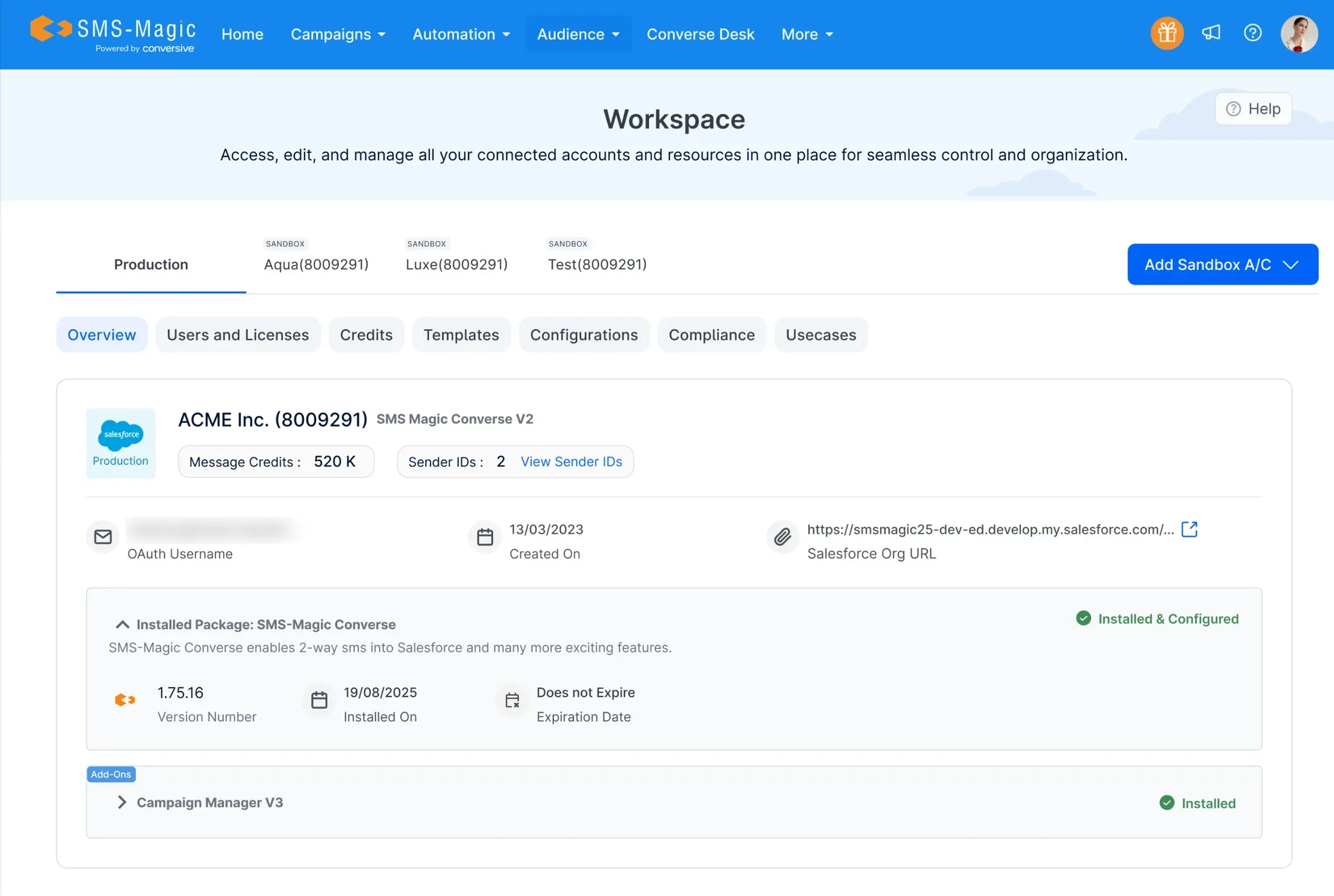
The Workspace became the central hub after installation: a single place to manage production and sandbox accounts, transfer credits and sender IDs, view audit logs, and access account details. This reduced support touchpoints around account management and gave customers the transparency that previously required a call.
✦
How It Works
Salesforce
SMS-Magic
SSO / Auth
⚠️Drop-off point
Before· ~60 min · 2 systems
AppExchange
"Get it now"
↓
Install SF package
In Salesforce org
↓
⚠️
Navigate to SMS-Magic
Separate website entirely
↓
⚠️
Create account
Fill registration form
↓
⚠️
Connect Salesforce org
Manual OAuth setup
↓
Configure & first send
Finally ready to use
After· ~15 min · single flow3 steps eliminated
AppExchange
"Get it now"
↓
Select org type
& data centre
↓
SSO redirect
Auto-captures all details
↓
Account auto-created
No form, no manual steps
↓
Workspace ready
Install starts automatically
SSO eliminated the need to visit SMS-Magic separately, since account creation happened automatically from Salesforce credentials.
Automatic account detection. Identifies existing Production or Sandbox accounts and links them automatically, with no manual API key errors.
—
Pre-built template library. The most commonly needed Salesforce configurations, browsable and installable in one click.
—
Workspace. Centralized management for accounts, credit and sender ID transfers, and audit logs.
—
Automated trial provisioning. The License Management App provisions a trial the moment the app installs. No manual step.
Workspace: every connected Salesforce org, its credits, sender IDs, and package status in one place.
✦
Outcome
The activation metric that surfaced the problem became the measure of success. Time-to-first-message dropped from 60 to 15 minutes, median, before and after the redesign. O&I was freed from routine setup calls, and mis-sequencing errors dropped since there was only one path to follow.
Beyond the metric
✓O&I freed from routine configuration calls
✓Mis-sequencing errors dropped sharply
✓Customers self-serve the most common setups
✦
What I'd Do Differently
Should’ve instrumented the old flow first
I didn’t have granular step-by-step drop-off data before redesigning, and that would’ve made prioritisation sharper.
Mixpanel told us time-to-first-message was high, and O&I confirmed where people were getting stuck, but I didn’t have granular step-by-step drop-off data for the old flow before we replaced it. That made it harder to know exactly which steps caused the most time loss. I’d always capture detailed funnel analytics on an existing flow before changing it, even one that’s clearly broken. It sharpens prioritisation and gives a cleaner before/after.
Template selection criteria could’ve been sharper
"Most common" and "most needed" aren’t the same thing. Usage data should’ve validated O&I’s instincts.
I based the template library on what O&I said was most common. That was the right instinct, but some templates were common because customers asked out of habit, not because they were essential. In hindsight I’d have paired O&I input with usage data from existing customers to validate which configurations were genuinely driving activation versus just frequently requested.